

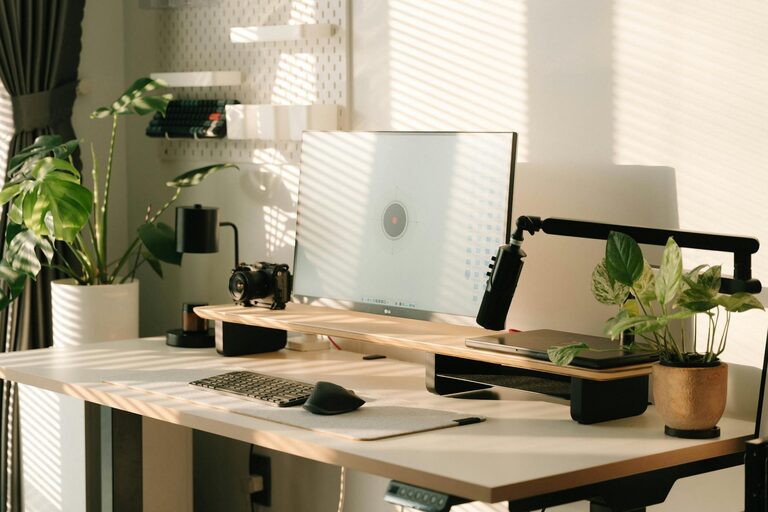
Setting up an effective home workspace is key to staying productive and comfortable throughout your workday. Whether you work remotely full-time or just occasionally, having a dedicated and well-organised area can help you focus better, reduce stress, and maintain a healthy work-life balance. In this post, we’ll explore practical steps to create a home workspace that supports your productivity and comfort.
Choose the Right Location
Your home workspace should ideally be a quiet area with minimal distractions. If you can, select a spot away from high-traffic zones such as the kitchen or living room. This helps signal to yourself and household members that you are working and need focus. Some options include:
– A spare room or a corner of a room with a door
– A nook by a window for natural light
– A quiet area separated from noisy household activities
Prioritise Ergonomics
Comfort is essential to maintaining focus and avoiding aches or injuries caused by prolonged sitting. Follow these ergonomic principles:
– Chair: Use a supportive chair with adjustable height and lumbar support. Your feet should rest flat on the floor.
– Desk: Your desk height should allow your forearms to rest parallel to the floor while typing.
– Screen placement: Position your screen at eye level about an arm’s length away to reduce neck strain.
– Keyboard and mouse: Place these close enough to avoid overreaching.
Investing in ergonomic accessories such as a footrest, wrist support, or adjustable monitor stand can make a significant difference.
Maximise Natural Light
Natural light boosts mood and energy, improving productivity. Position your desk near a window if possible. However, avoid glare on your screen by using blinds or curtains to diffuse harsh sunlight. If natural light is limited, complement your workspace with soft, bright LED lighting that reduces eye strain.
Declutter and Organise
A tidy workspace helps maintain mental clarity. Consider the following organisational tips:
– Use desk organisers or trays to keep pens, papers, and other essentials neat.
– Store rarely used items in drawers or shelves.
– Keep cables tidy with clips or sleeves to avoid tangling.
– Regularly clear out unnecessary items to maintain a clean surface.
Personalise Your Space
Adding personal touches can make your workspace inviting without overwhelming it. Ideas include:
– Framed photos or artwork
– A few small plants for freshness and improved air quality
– A comfortable cushion or throw
Personalisation helps create a positive atmosphere conducive to extended periods of focused work.
Set Clear Boundaries
When working from home, it’s easy for work and personal life to blur. Establish clear boundaries by:
– Setting specific work hours and sticking to them
– Informing household members of your schedule to minimise interruptions
– Using noise-cancelling headphones if background noise is unavoidable
These boundaries support concentration and help separate work from relaxation time.
Optimise Technology and Connectivity
Reliable technology is fundamental for smooth remote working. Ensure:
– Your internet connection is stable and fast enough for video calls and uploads/downloads.
– Your computer and software are updated and functioning well.
– You have necessary accessories like a headset, webcam, or external keyboard.
– Backup solutions are in place to avoid data loss.
Keeping technology in good order reduces frustration and downtime.
Incorporate Break Spaces and Movement
Staying in one position for too long can cause fatigue. Make space for short breaks and easy movement:
– Stand or stretch every hour to prevent stiffness.
– Use a timer or app to remind you to take breaks.
– Consider a sit-stand desk for alternating postures during the day.
Movement supports both physical health and mental alertness.
Maintain Good Air Quality
Fresh air prevents drowsiness and maintains wellbeing. Improve air quality by:
– Opening windows regularly for ventilation.
– Using an air purifier if your home is prone to dust or pollution.
– Adding indoor plants known for their air-cleaning abilities, such as spider plants or peace lilies.
A breath of fresh air can keep your mind sharp.
Final Thoughts
Creating an effective home workspace involves both practical and personal considerations. By selecting the right location, prioritising ergonomic comfort, and setting clear boundaries, you’ll foster an environment that enhances productivity and wellbeing. Small touches like natural light, decluttering, and personalisation make all the difference in enjoying your work-from-home experience.
Remember, the perfect workspace is one that suits your individual needs and helps you focus while feeling comfortable and motivated. Take time to evaluate and adjust your setup as your work habits evolve. With these tips, you’re well on your way to crafting a home office that works for you.